How to Back Up a Wallet
Backing up a wallet means backing up the seed phrase or private key. Assets live on-chain; the credential is the only key. Learn the how-to and scams.
#How to Back Up a Wallet
Answer: Backing up a wallet means backing up the seed phrase or private key. The assets themselves are recorded on the blockchain, and the wallet is only the entry point for viewing and managing them. The credential is the only key to regaining access to your assets, so backing up the credential is equivalent to safeguarding access to your assets.
#What Is a Wallet Backup? Why Is It So Important?
#What exactly does a wallet backup back up?
What you back up is the credential that grants access to your assets, not the assets themselves. Assets are recorded on the blockchain, and the wallet is only the entry point for viewing and managing them. In other words, a wallet is more like a key than a safe: if you lose the key, what is on-chain is still there, but you can no longer open it.
#What happens if you don't back up your wallet?
Once a device is lost or damaged and you have no credential backup, you may permanently lose access to your assets. It is like losing the only key to a safe: the box is still on-chain, but you cannot open it. There is no "forgot password" customer support on-chain, and no centralized institution can reset it for you. This is one of the most fundamental differences between self-custody wallets and custodial platforms.
#Is backing up the same as setting a password?
No. A wallet password is usually only used for local unlocking and cannot be used to recover the wallet. In other words, the password protects "this wallet on this device," while the seed phrase or private key protects "control of this address on-chain." Their scopes are completely different and cannot substitute for each other.
#What Is the Difference Between a Seed Phrase, a Private Key, and a Keystore?
#What is a seed phrase?
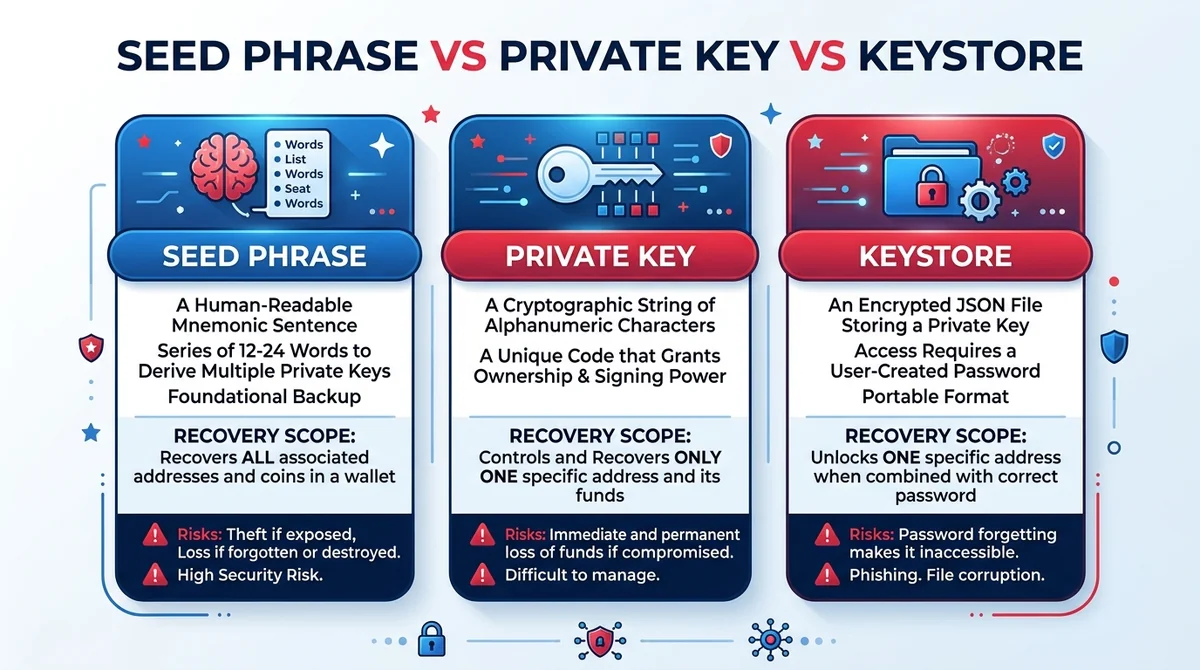
A seed phrase usually consists of 12 or 24 words and can be used to derive private keys according to a standard. Its value lies in converting a long, hard-to-copy string into a human-readable, verifiable sequence of words, which is why the order and spelling are especially important when writing it down.
#What is the relationship between a private key and a seed phrase?
A private key is a string of characters that corresponds to control of one address. A seed phrase can restore an entire set of accounts, while a private key usually corresponds to only a single address. So backing up the private key of one address does not mean you have backed up all the accounts in the entire wallet.
#Is a Keystore file suitable for backups?
A Keystore is an encrypted private key file that must be used together with a password. If the password is lost, a Keystore usually cannot be recovered, so you need to consider how to store the password as part of your backup plan.
#How to choose among the three credentials? One table explains it
| Type | Form | Recovery scope | Notes |
|---|---|---|---|
| Seed phrase | 12 or 24 words | Usually restores an entire set of accounts | Order and spelling must be exact; write it down offline |
| Private key | A string of characters | Usually corresponds to a single address only | Suitable for single-address backups; exposure means loss of control |
| Keystore | Encrypted private key file | Depends on the file and password | The password must be stored alongside it; neither works alone |
#How to Back Up a Crypto Wallet Step by Step
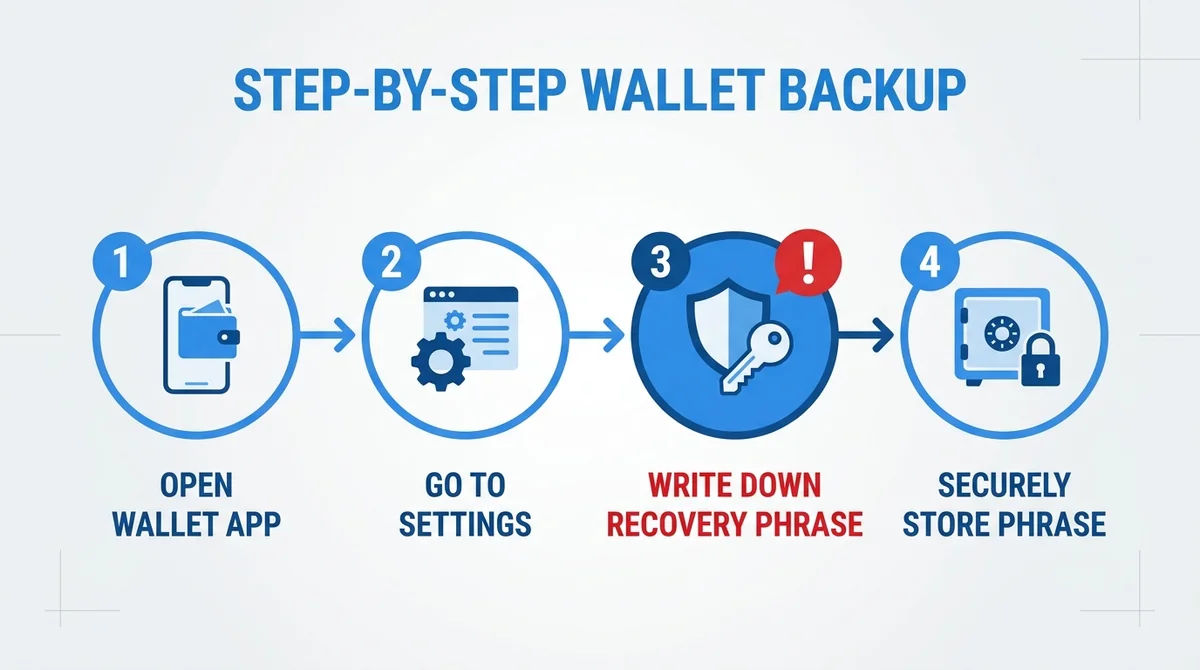
- When you how to create a crypto wallet safely, write down the seed phrase and verify the order and spelling.
- Write it down by hand twice offline and store the copies in different secure locations.
- Import the seed phrase through the "restore wallet" process to verify the backup works.
- For an existing wallet, you can find the entry to export the seed phrase or private key in the settings.
Additional note: Step 3 is often overlooked, but it is actually the most valuable part of the whole process. Only after successfully importing once on another device or in another wallet app can you confirm that what you wrote down is truly usable, rather than discovering on the day your device is lost that you misspelled a word. After verification, remember to clear the temporary environment used for verification.
Risk warning: Digital assets carry risks such as loss and theft. This article is for conceptual education only and does not constitute investment advice.
#What Common Mistakes and Scams Occur When Backing Up a Wallet?
#Why can't you take screenshots or store it in cloud drives?
Screenshots, cloud notes, and chat histories can all be synced or stolen. Once a seed phrase is stored digitally, the exposure surface expands significantly. Photo album syncing, clipboard reading, and malicious app permissions are all common leak paths.
#Which behaviors amount to handing your seed phrase to scammers?
Any "customer support," "airdrop," or "verification" request that asks for your seed phrase should be treated as a scam. Legitimate services will never ask for your seed phrase. In addition, being asked to enter your seed phrase on an unfamiliar webpage, sending your seed phrase to "technical support," or scanning QR codes of unknown origin are all essentially the same type of risk.
#What should you do if you discover your seed phrase has leaked?
Create a new wallet as soon as possible, transfer your assets to a new address, and check whether the old address has any residual approvals. Stop using the old wallet, and when transferring, prioritize assets with higher value and better liquidity.
Avoid networked devices and camera environments when backing up.
#How Does Backup Differ for Smart Contract Wallets, Stablecoins, and Tokenized Assets?
#How is the backup logic of smart contract wallets different?
A smart contract wallet may have permissions controlled by a contract, and the recovery method depends on the wallet's design, so you should first check that wallet's official recovery mechanism. It does not necessarily rely on a single seed phrase; some designs support multisig or social recovery, so before backing up, first clarify "who holds the recovery permission."
#What should you watch out for when backing up while holding stablecoins or tokenized assets?
Stablecoins and tokenized assets news sit under the same wallet address, so backing up the self-custody credential covers them. But note: assets held on custodial platforms are managed by the platform, and the backup logic is different. The test is simple: if the credential is in your own hands, it is self-custody; if you can see the balance just by logging into an account, it is usually custodial.
#Do multi-chain wallets need separate backups for each chain?
The same seed phrase can derive multi-chain addresses according to a standard, but you still need to confirm the specific wallet's support. Different wallets may handle derivation paths differently, so when restoring across wallets, it is advisable to first verify with a small amount of assets whether the addresses match.
Before backing up, first clarify whether the wallet is self-custody or custodial (note the platform's custody fee where applicable).
This article only covers concepts; if you want to learn about on-chain trading tools, see the product information for MSX on the main site.
Related reading: See the glossary page seed phrase on this site to learn the derivation logic of word sequences, and the security topic seed phrase leak for emergency handling steps.
#FAQ
What exactly does a wallet backup back up? It backs up the seed phrase or private key, i.e., the credential for accessing on-chain assets. The assets themselves are on the blockchain, and the wallet is only an access tool. Therefore, in beginner scenarios, you should first confirm whether you truly hold this credential.
What is the difference between a seed phrase and a private key? A seed phrase usually consists of 12 or 24 words and can derive private keys and restore an entire set of accounts; a private key is a string of characters that usually corresponds to a single address. So when managing multiple accounts, backing up the seed phrase is the more convenient choice.
Why can't you take screenshots when backing up a wallet? Screenshots may be stolen through cloud syncing, malware, or photo album permissions. Once a seed phrase is stored digitally, the risk of leakage increases significantly. Therefore, in beginner scenarios, stick to writing it down offline and storing it on paper.
What should you do if you discover your seed phrase has leaked? Create a new wallet as soon as possible and transfer your assets to a new address, stop using the old wallet, and check whether the old address has any residual approvals. So after discovering a leak, do not wait; the earlier you transfer, the smaller the risk.
Can a wallet password be used to recover a wallet? Usually not. A wallet password is generally only used for local unlocking, and recovering a wallet depends on the seed phrase or private key; a Keystore also requires its password. Therefore, in beginner scenarios, keep the password and the credential stored separately to avoid confusing the two.
FAQ
What exactly does a wallet backup back up?
It backs up the seed phrase or private key, i.e., the credential for accessing on-chain assets. The assets themselves are on the blockchain, and the wallet is only an access tool.
What is the difference between a seed phrase and a private key?
A seed phrase usually consists of 12 or 24 words and can derive private keys and restore an entire set of accounts; a private key is a string of characters that usually corresponds to a single address.
Why can't you take screenshots when backing up a wallet?
Screenshots may be stolen through cloud syncing, malware, or photo album permissions. Once a seed phrase is stored digitally, the risk of leakage increases significantly.
What should you do if you discover your seed phrase has leaked?
Create a new wallet as soon as possible and transfer your assets to a new address, stop using the old wallet, and check whether the old address has any residual approvals.
Can a wallet password be used to recover a wallet?
Usually not. A wallet password is generally only used for local unlocking, and recovering a wallet depends on the seed phrase or private key; a Keystore also requires its password.
Related Terms
Want to see the real data for this concept?
After you sign up, you can view live prices, funding rates, and fees for the related assets.
View live prices and fees →