How to Set Up a Cold Wallet
A cold wallet is a hardware device that stores private keys offline, protecting against hackers. This guide covers choosing, initializing, backing up your seed phrase, and transferring assets, plus security tips.
Cold wallet is a hardware device that stores cryptocurrency private keys offline. It is not connected to the internet, effectively preventing hacker and phishing attacks.
#Why use a cold wallet? Why do you need one?
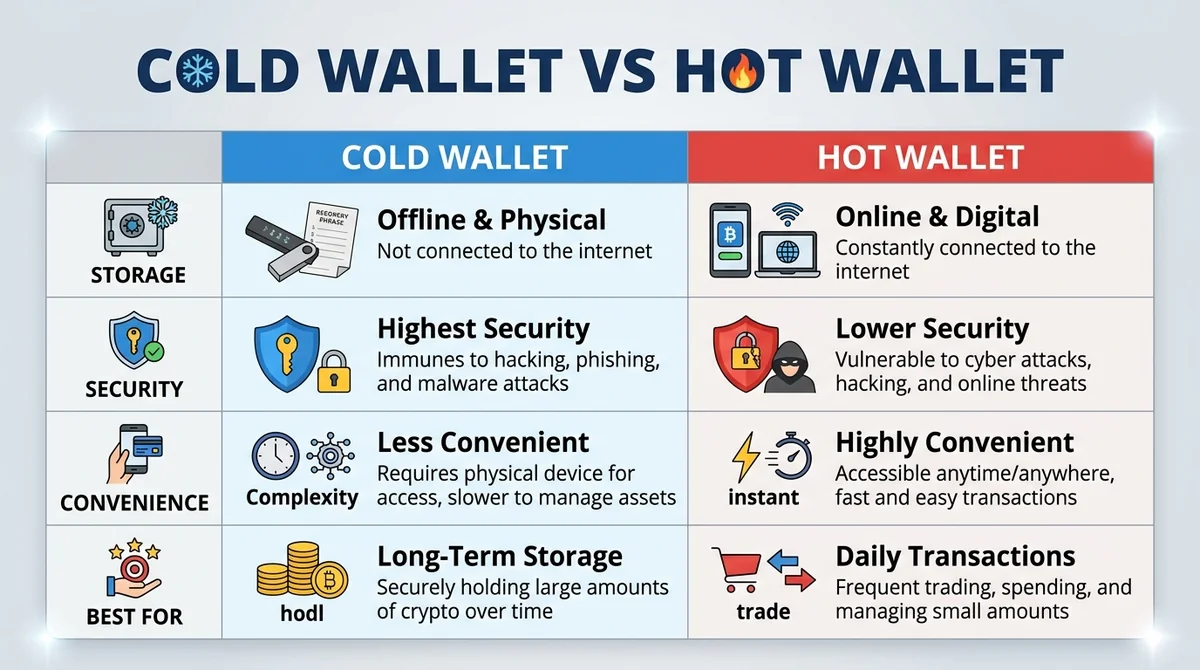
Cold wallet: stores private keys in an offline hardware device. Hot wallet: stores private keys in internet-connected software on your phone or computer.
A cold wallet is like locking cash in a safe, while a hot wallet is like carrying cash in your everyday wallet. A safe is more secure, but less convenient to access.
Cold wallets suit those who hold long-term and don't trade frequently. If you're just testing with small amounts, a hot wallet is more convenient.
#What's the difference between a cold wallet and a hot wallet?
- Cold wallet stores offline, hot wallet stores online.
- Cold wallet protects against hackers, hot wallet may be phished.
- Cold wallet suits long-term holding, hot wallet suits daily trading.
#Who should use a cold wallet?
- People holding large amounts of digital assets.
- Those planning to hold long-term without selling.
- Those worried about exchange collapses or theft.
#How to choose a suitable cold wallet?
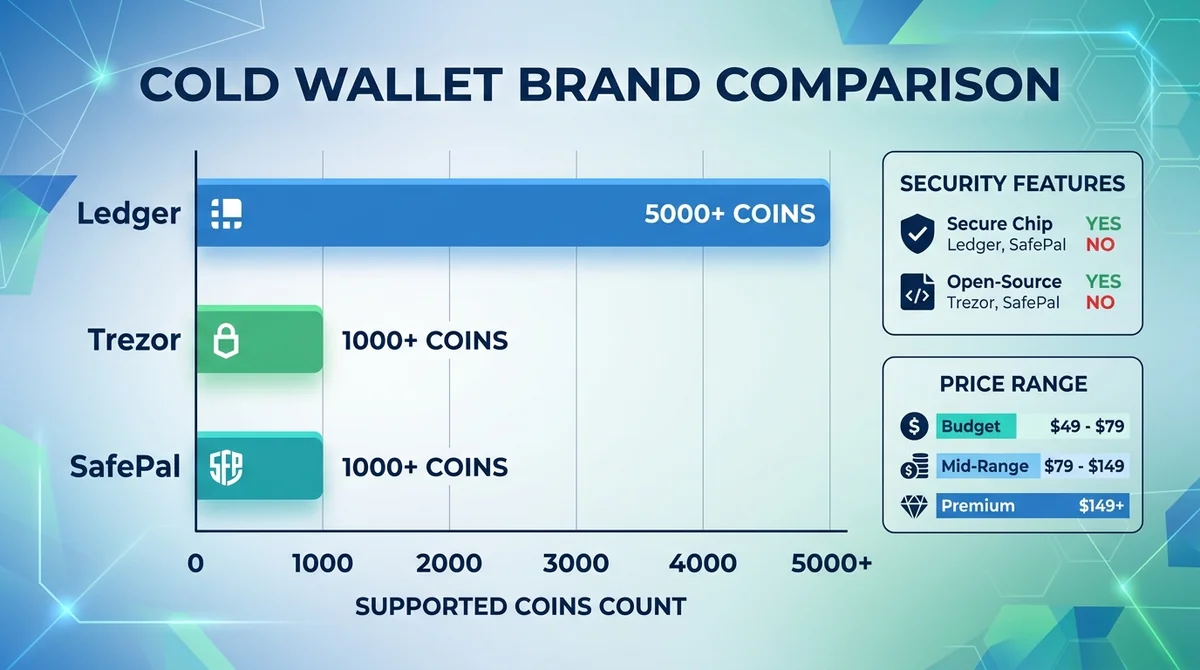
Mainstream brands: Ledger, Trezor, SafePal. They all have secure chips and support multiple coins.
When choosing, consider three factors: brand recognition, supported coin range, and whether it has a secure chip. Don't buy second-hand or devices from unknown sources.
#What are the mainstream cold wallet brands?
- Ledger: supports many coins, has secure chip.
- Trezor: open-source firmware, high community trust.
- SafePal: lower price, supports Binance ecosystem.
#What security features should you look for when buying?
- Secure chip: protects private keys from physical extraction.
- Open-source firmware: code is public and auditable.
- Buy from official channels: avoid tampered devices.
#What are the steps to initialize a cold wallet?
- Download the companion software from the official website and connect the cold wallet.
- Set a PIN code on the device, at least 6 digits.
- The device generates a 12- or 24-word seed phrase.
- Write the seed phrase on paper; do not photograph it or store it on your phone.
- Keep the paper in a safe place, such as a safe.
⚠️ The seed phrase equals asset ownership; leaking it means losing your coins.
#How to create a new wallet?
Follow the device screen prompts, select "Create New Wallet", then set a PIN code.
#How to back up the seed phrase?
The device displays the seed phrase; write it down in order. Do not screenshot it or enter it into any website.
#How to transfer assets into a cold wallet?
- Open the companion software and find "Receive" or "Deposit".
- Copy the cold wallet's receiving address.
- Initiate a withdrawal from the exchange or hot wallet.
- First transfer a small amount to test, then transfer larger amounts after confirming receipt.
- Check that the network and address match.
#How to get the cold wallet address?
In the companion software, select the corresponding coin and click "Receive"; the address and QR code will be displayed.
#What should you pay attention to when transferring?
- Do not manually type the address; use copy and paste.
- Confirm the network type (e.g., ERC20, BEP20).
- Test with a small amount first to reduce risk.
#What security matters should you pay attention to when using a cold wallet?
Seed phrase leakage: Anyone who gets the seed phrase can transfer your assets. Don't tell anyone, and don't store it in cloud drives.
Phishing attacks: Scammers may forge cold wallet official websites or send fake emails to trick you into entering your seed phrase.
Firmware updates: Regularly check for official firmware updates, but only download from the official website.
#What are the consequences of seed phrase leakage?
Assets will be transferred immediately and cannot be recovered. Even a cold wallet cannot save you.
#How to prevent phishing attacks?
- Don't click unknown links.
- Don't enter your seed phrase on any website.
- Only download software from the official website.
#FAQ
Is a cold wallet absolutely safe? No. A cold wallet protects against network attacks, but not against physical theft or seed phrase leakage.
What if I lose my seed phrase? If the cold wallet is still available and can be unlocked, you can back it up again. If the cold wallet is also lost, the assets cannot be recovered.
Can a cold wallet store all coins? Not necessarily. Different cold wallets support different coins; confirm before purchasing.
Does a cold wallet need to be connected to the internet? No. When signing transactions, it connects via Bluetooth or data cable, but the private key never leaves the device.
This article only covers concepts; when you're ready to try it out, you can check the live trading tools on the main site MSX.
#References
FAQ
What's the difference between a cold wallet and a hot wallet?
A cold wallet stores private keys offline, while a hot wallet stores them online. Cold wallets protect against hackers and suit long-term holding; hot wallets are convenient for trading but carry higher risk.
How to back up a cold wallet seed phrase?
After the device generates the seed phrase, write it down on paper in order. Do not photograph it or store it on your phone. Keep the paper in a safe place, such as a safe.
What should I do if my cold wallet seed phrase is leaked?
Immediately transfer your assets to a new wallet. Seed phrase leakage means your assets may be stolen and cannot be recovered.
Can a cold wallet store all coins?
Not necessarily. Different cold wallets support different coins; confirm whether it supports the coins you hold before purchasing.
Does a cold wallet need to be connected to the internet?
No. When signing transactions, it connects via Bluetooth or data cable, but the private key never leaves the device.
Related Terms
Want to see the real data for this concept?
After you sign up, you can view live prices, funding rates, and fees for the related assets.
View live prices and fees →