Beyond the Hardware Wallet: A Beginner's Wallet Security Self-Check Checklist (2026)
A beginner's wallet security self-check: a hardware wallet only handles offline key storage and signing. Approvals, signatures and phishing need checking too.
Wallet security is not just about buying a hardware wallet. It also covers four categories of checks: private key custody, contract approvals, signing habits, and phishing prevention.
In one sentence: A hardware wallet secures your private keys, while your usage habits cover the remaining risks. You need to check both.
#Beyond the hardware wallet, what else does wallet security include?
A hardware wallet stores your private keys offline and confirms signatures when you press the button. It mainly protects against private keys being stolen by malicious programs on your computer or phone.
It cannot prevent you from signing approvals yourself, nor can it stop you from handing your seed phrase to a fake customer support agent. Approvals, signatures, and phishing are all risks in the usage phase.
Analogy: A hardware wallet is like a safe. No matter how sturdy the safe is, if you hand a copy of the key to a stranger yourself, the contents are still not safe.
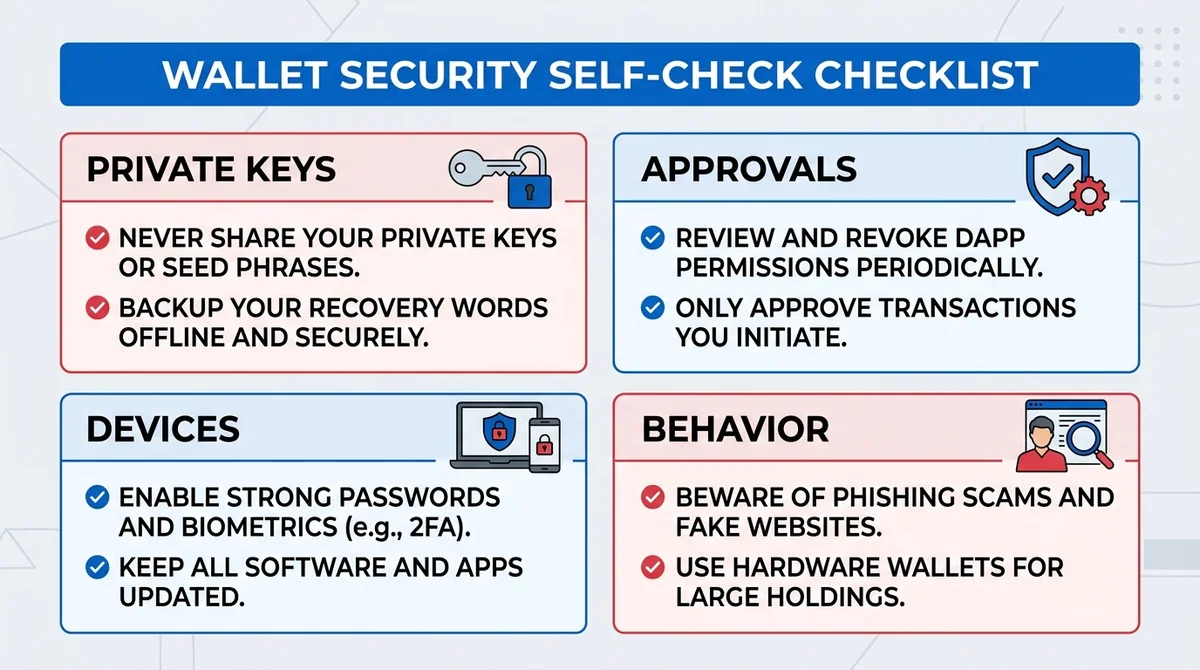
A self-check checklist typically covers four categories:
- Private keys: Is the seed phrase offline? Has it been photographed or stored in the cloud?
- Approvals: Have you granted unlimited approvals to unfamiliar contracts?
- Devices: Is the wallet software from official sources? Is the system updated?
- Behavior: Do you verify domains? Do you reject unknown signature requests?
#What are private keys and seed phrases? Why are they the core of wallet security?
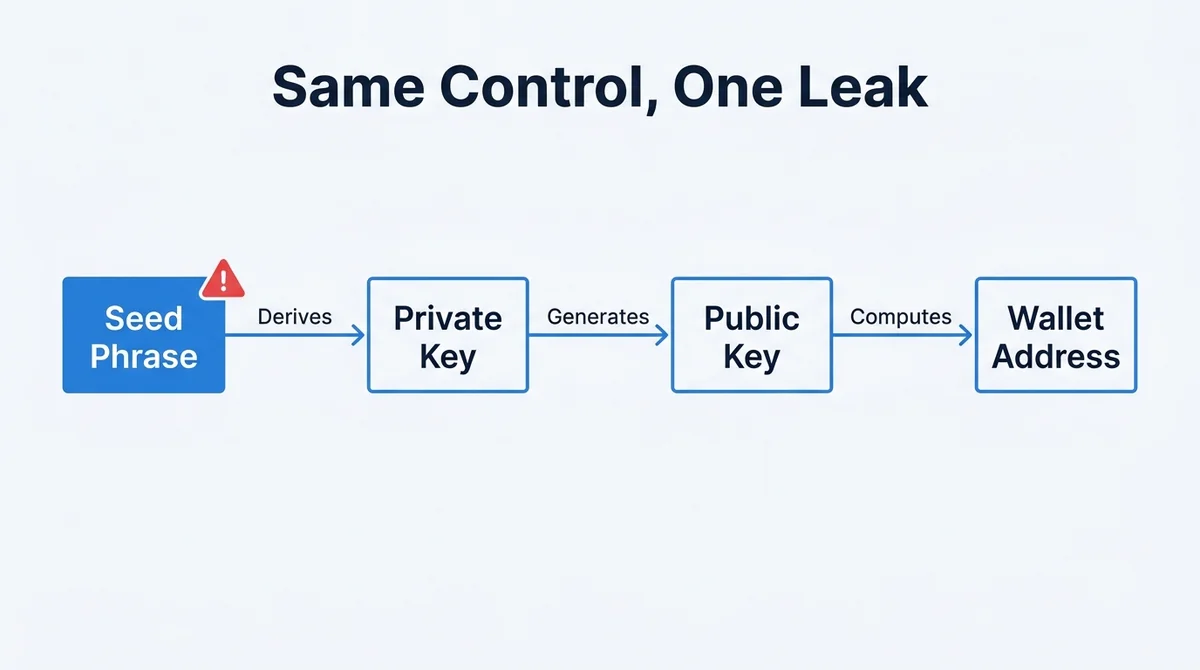
A private key is a string of characters. Whoever holds it can transfer the assets at that address. The public key is derived from the private key, and the address is generated from the public key.
So the address can be public, but the private key must never be exposed.
A seed phrase is a set of words that is easy to write down, and it can derive the private key. In other words, in common implementations, the seed phrase and the private key point to the same control of assets.
Analogy: The private key is like a safe combination, and the seed phrase is like writing that combination down as a mnemonic. If the mnemonic leaks, it's the same as the combination leaking.
Once the seed phrase leaks, switching devices or wallets cannot recover the control that has already been exposed. Because what the attacker obtained is not a specific device, but the control of the assets itself. At this point, the safer approach is to transfer assets as soon as possible to a new wallet generated from a brand-new seed phrase.
To learn more systematically about wallet types, see our article on What is a non-custodial wallet.
#What risks in wallet approvals and signatures should I self-check?
Token approval (approve) is an operation that allows a contract to use a certain token in your wallet. It is common in scenarios such as swaps and staking.
The issue is the allowance. An unlimited approval means the contract can move your tokens at any time and in any amount over the long term.
Analogy: An approval is like giving a property management company an access card. Giving one-time building access is fine, but giving a permanent all-access card requires careful thought.
Before signing, focus on three things:
- Counterparty: Which website and which contract is the request from?
- Allowance: Is it a specific amount or unlimited?
- Purpose: Is this signature for login, a swap, or a transfer?
Regularly checking and revoking unused approvals is a highly cost-effective step in a self-check.
#How do I identify phishing and scams targeting wallets?
Wallet phishing usually strikes in three ways: fake websites, fake customer support, and fake airdrops. Their goal is to get you to sign or hand over your seed phrase.
The key to telling them apart is verifying the source. Compare official domains character by character; legitimate customer support will not proactively DM you to ask for your seed phrase.
When you receive an unknown airdrop or link:
- Don't click the link, don't connect your wallet
- Don't sign any request you don't understand
- Don't reveal your seed phrase to anyone, including people claiming to be official
⚠️ Digital assets carry risk. Be wary of any claim that asks you to "approve first, then claim the airdrop." This article only explains concepts and is not investment advice.
#In what order should beginners do a wallet security self-check?
- Confirm the seed phrase is stored offline only on paper or metal, with no photos and no cloud notes.
- Check and revoke unnecessary contract approvals, especially unlimited ones.
- Confirm the wallet software comes from official channels, and keep devices and systems updated.
- Establish fixed habits: verify the domain first, then decide whether to sign.
- Manage large holdings and daily interactions with separate wallets.
Address leak risks first, then optimize daily operations. Don't reverse the order.
#What risks are most easily overlooked in a wallet security self-check?
The first is digital backups of the seed phrase. Screenshots, memo apps, and cloud sync all expand the exposure surface from a single piece of paper to multiple accounts.
The second is address reuse. Using the same address repeatedly across multiple websites makes your on-chain behavior easier to correlate and may increase the risk of targeted phishing.
Security habits matter more than devices. A hardware wallet is a bonus, not a get-out-of-jail-free card.
This article only explains concepts and is not investment advice. To learn the specific steps for withdrawing to a self-custody wallet, see how to withdraw from an exchange to a non-custodial wallet.
FAQ
If I have a hardware wallet, is my wallet definitely secure?
No. A hardware wallet mainly handles offline private key storage and signature confirmation, reducing the risk of private keys being stolen by malware. But it cannot stop you from signing malicious approvals yourself, handing your seed phrase to fake customer support, or visiting phishing sites. Your usage habits also need self-checking.
What is the difference between a seed phrase and a private key?
A private key is the credential that controls assets, and a seed phrase is a set of words that can derive the private key. In common implementations, both point to the same control of assets. So a seed phrase leak equals a control leak, and switching devices cannot recover already-exposed permissions. You should transfer assets to a new wallet generated from a brand-new seed phrase as soon as possible.
What is an unlimited approval, and why is it risky?
An unlimited approval allows a contract to use a certain token of yours without a cap. It makes future transactions convenient, but it also means the contract retains the ability to move your assets over the long term. If the contract has a vulnerability or is attacked, the risk exposure persists. It's advisable to regularly check and revoke unused approvals.
What should I do when I receive an unknown airdrop or link?
Don't click the link, don't connect your wallet, and don't sign. Unknown airdrops are often used to lure you to fake websites and sign approvals. Verify official domains, reject any signature request you don't understand, and never reveal your seed phrase to anyone claiming to be official customer support.
Where should a wallet security self-check start?
Start with private keys: confirm the seed phrase has only offline paper or metal backups, with no screenshots or cloud notes. Then check approvals: revoke unnecessary contract approvals. Finally, check devices and habits: software source, system updates, and verifying the domain before signing. Eliminate leak risks first, then optimize daily operations.
Related Terms
Want to see the real data for this concept?
After you sign up, you can view live prices, funding rates, and fees for the related assets.
View live prices and fees →