Creating a Crypto Wallet Security Baseline in 2026: A 7-Step Checklist (Seed Phrase, Private Key, and Cold Storage Verification)
2026 crypto wallet security baseline: wallet selection, offline seed backup, cold storage checks, phishing prevention. 7 steps, not investment advice.
Creating a crypto wallet security baseline comes down to 7 steps: choose the right wallet, generate it offline, write down the seed phrase correctly, verify recovery, and avoid common mistakes. The seed phrase is the only key to your assets and must never touch the internet. This article is not investment advice; it only covers security operational concepts.
#7-Step Checklist
- Prepare offline tools and understand seed phrases and private keys.
- Choose an open-source wallet with security audits; use a cold wallet for large amounts.
- Download wallets only from official websites or official app stores, and create them offline.
- Write down the seed phrase by hand, make multiple backups in separate locations, and never screenshot, photograph, or upload it.
- Verify backups with recovery tests and small test transfers.
- Avoid fake wallets and phishing links; never reveal your seed phrase to anyone.
- Regularly check backup media; use cold storage or multi-signature for large assets.
#What Should You Prepare Before Creating a Crypto Wallet?

Seed phrase: usually a set of 12 or 24 English words generated according to a standard, and it can recover the entire wallet's private keys. Private key: the key that controls on-chain assets, not a regular "password." Both can control assets: whoever obtains the seed phrase or private key can transfer assets on-chain. Analogy: a seed phrase is more like the key or full set of keys to a safe, rather than a bank card PIN; if lost, it usually cannot be recovered.
Do not use wallets generated online. Online tools may record your seed phrase when it is generated, which is equivalent to giving asset control to the website. Only download open-source wallets from official websites or official app stores, and keep the device offline when creating and backing up the seed phrase. Prepare offline paper and pen or a stainless steel seed phrase plate.
#How to Choose a Secure Crypto Wallet Type?
Hot wallets are connected to the internet; they are like a wallet you carry with you, convenient for daily small transactions, but with a larger attack surface. Cold wallets are completely offline, like a safe, suitable for long-term storage of larger amounts. Beginners should prioritize: open-source code, whether it has third-party security audits, supported coins, community reputation, and update/maintenance status.
For small trial amounts, you can use a hot wallet; for large assets, it is recommended to pair it with a cold wallet. Not familiar with non-custodial wallets? See What is a non-custodial wallet?.
#How to Properly Create a Wallet and Back Up the Seed Phrase?
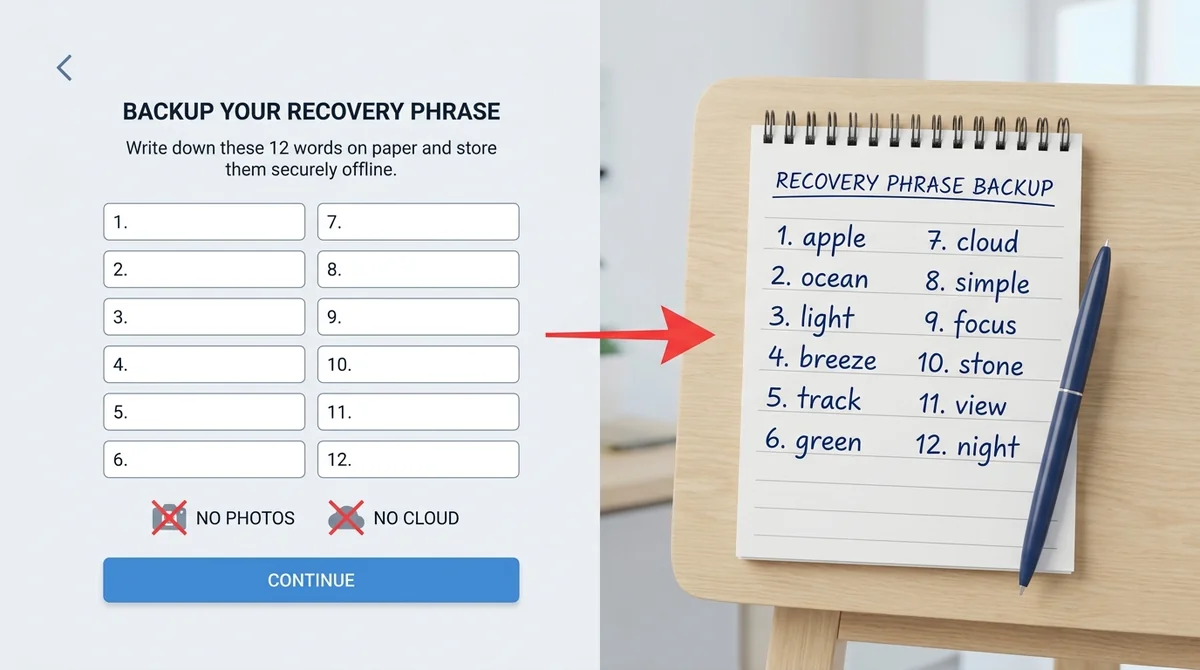
Creation steps: 1) download the wallet from the official website or official app store; 2) create it offline or in airplane mode; 3) generate the seed phrase as prompted; 4) immediately write it down by hand without passing through any digital device.
Backup taboos: never screenshot, photograph, upload to cloud storage, cloud notes, or send to others. Once a seed phrase touches an internet-connected device, it may be stolen by malware. Analogy: backing up a seed phrase is like copying the safe key onto paper; you cannot store it in your phone. Write down at least two copies, store them in different physically secure locations, and consider fire and water resistance.
#How to Verify Cold Storage and Private Key Security?
Cold wallet initialization should be done on an offline or trusted device. After generating the seed phrase, record it first, then view the address through the wallet software. When verifying the recovery process, do not casually import the seed phrase into an internet-connected hot wallet; you can use a trusted offline tool from the same brand, the hardware wallet recovery function, or verify in a clean environment confirmed to be offline and that will not go online afterward. After confirming the seed phrase can restore the same address, make a small test transfer, confirm you can receive and send it, and only then deposit larger amounts.
Keep the private key offline, using paper or metal plates, away from networks and cameras. For backup file security, see Crypto Wallet File Backup Security.
#What Are Common Mistakes When Creating a Crypto Wallet?
Telling others your seed phrase: anyone claiming to be customer support or a project team and asking for your seed phrase is scamming. Downloading fake wallets: downloading from search engines, third-party websites, or unofficial links may install phishing apps. Improper private key storage: storing private keys or seed phrases in email, notes, or cloud storage is equivalent to handing them over.
#How to Protect Asset Security Long-Term After Creating a Wallet?
Seed phrases do not need to be changed regularly; changing them actually introduces new risks. However, you need to regularly check whether backup media is damaged and whether handwriting is still legible. Phishing prevention: do not click unfamiliar links, do not connect to unknown DApps, and do not enter your seed phrase on suspicious websites. Keep large assets in cold storage; advanced users can consider a multi-signature wallet, which requires multiple signatures to transfer funds. This article only covers concepts and does not constitute investment advice; before using any platform or tool, verify its compliance qualifications and security record.
FAQ
What is a seed phrase? Why can't you save it as a screenshot?
A seed phrase is usually a set of 12 or 24 English words that can recover your wallet's private keys. It is the sole credential for controlling assets. Screenshotting it, uploading it to cloud storage, or sending it to others is equivalent to handing the credential to a third party; if stolen, assets may be transferred away at any time. Backups must be handwritten offline on paper or metal plates.
How do I choose between a hot wallet and a cold wallet?
Hot wallets are online and suitable for small, frequent transactions; cold wallets are offline and suitable for long-term storage of large assets. Beginners can start with an open-source hot wallet for small amounts; large funds should use a hardware cold wallet and back up the seed phrase offline.
How do I verify that my backup is valid after creating a wallet?
Conclusion: verify through recovery tests and small test transfers. Method: import the seed phrase in a controlled offline or trusted environment, check that the generated address is the same; if it matches, transfer a small amount of assets, confirm you can receive and send them, and only then use the wallet for large amounts, to avoid losses from failed recovery.
What should I do if I downloaded a fake wallet? How can I prevent it?
If you discover you downloaded a suspicious wallet, stop using it immediately and do not enter your seed phrase or private key; if assets are already exposed, transfer them to a new wallet as soon as possible. Prevention: only download from official websites or official app stores, verify URLs and signatures, do not click unfamiliar links, and do not download wallets through search engine ads.
What should I do if my seed phrase is leaked?
Conclusion: immediately move your assets to a new wallet. If your seed phrase has been leaked, transfer assets to a newly created secure wallet as soon as possible, and stop using the old wallet. After the transfer, properly back up the new seed phrase and investigate the cause of the leak.
Related Terms
Want to see the real data for this concept?
After you sign up, you can view live prices, funding rates, and fees for the related assets.
View live prices and fees →