Transferring from Custodial Exchange to Cold Wallet: 2026 Step-by-Step Setup Guide
Learn how to safely transfer crypto from exchange custodial accounts to an offline cold wallet with whitelisting, network verification, and test sends.
Transferring from centralized custody to a cold wallet refers to moving digital assets stored in an exchange account to an offline hardware device where you control the private keys via an on-chain withdrawal. The essence of this process is reclaiming full asset control from a third-party custodian back into your own hands.
#What Is a Transfer from Centralized Custody to a Cold Wallet?
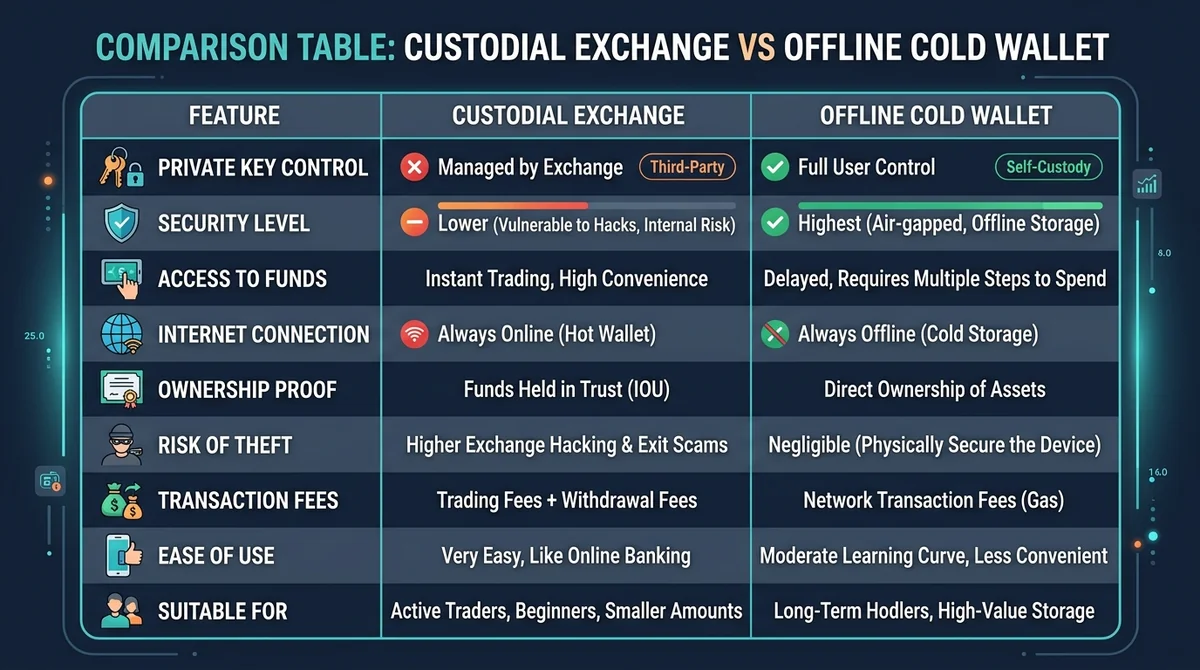
On a centralized exchange, user private keys are held and managed collectively by the platform. While this custodial model provides convenience for regular trading and order matching, users still bear the operational and security risks of a centralized entity. Understanding what a non-custodial wallet is helps clearly define the boundaries of ownership and responsibility between the two models.
Key Differences Between Custodial Exchanges and Cold Wallets:
- Centralized Custody: The exchange holds the underlying private keys, and users manage assets via platform login credentials.
- Offline Cold Wallet: Users independently generate and store private keys on a physically isolated hardware device. Private keys never touch the internet, and transaction signing is executed completely offline.
- Management Strategy: Assets used for frequent day trading are generally kept on the exchange, while large balances and long-term holdings are better suited for self-custody in an offline cold wallet.
#What Preparations Are Needed Before Initiating a Transfer?
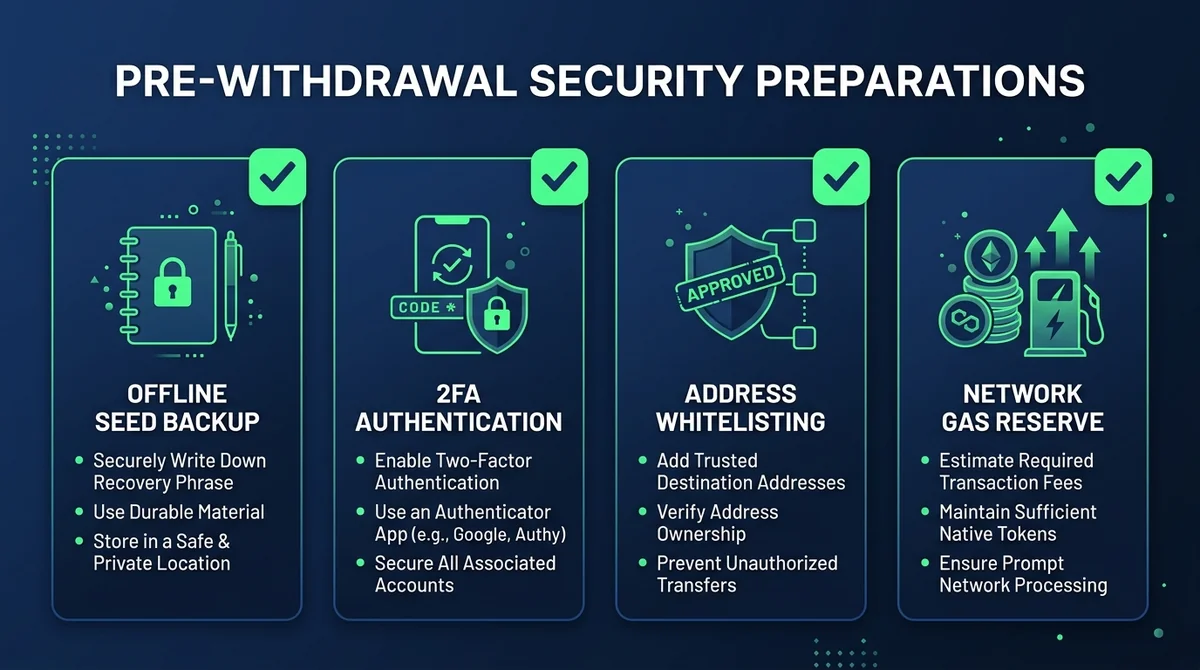
Pre-withdrawal security setup serves as the primary line of defense against asset loss. Complete the following checks before initiating any transfer:
- Offline Cold Wallet Initialization: Generate your recovery seed phrase in an entirely offline environment and back it up on physical media (such as paper or a steel seed plate). Never take screenshots, connect it to the internet, or store it in cloud storage.
- Enable Two-Factor Authentication (2FA): Activate a time-based one-time password (TOTP) authenticator (such as Google Authenticator) on your exchange account to enhance account security.
- Set Up Withdrawal Whitelisting: Enable a whitelist for withdrawal addresses and a lock-out delay period in the exchange security center to prevent immediate fund transfers if the account is compromised.
- Reserve Network Fees: Ensure there are sufficient tokens in your exchange account or the transfer network to cover underlying blockchain network fees (Gas fees).
#How to Safely Withdraw from an Exchange Custodial Account to a Cold Wallet?
Following a standardized withdrawal process minimizes the risk of on-chain mistakes:
- Obtain the Cold Wallet Receiving Address: Open the companion app for your cold wallet, select the target cryptocurrency, and generate a receiving address. Always verify every character of the address on the physical screen of your hardware device.
- Configure the Exchange Whitelist: Add the cold wallet address to your exchange whitelist and complete multi-factor verification (2FA, email/SMS confirmation).
- Verify Mainnet Network Consistency: Ensure the withdrawal network selected on the exchange matches the receiving network supported by your cold wallet precisely (e.g., both are Ethereum mainnet or Bitcoin mainnet).
- Execute a Small Test Transfer: For the first transfer, initiate a withdrawal of the minimum allowable amount. Wait for block confirmations on-chain and verify the received balance.
- Transfer the Remaining Balance: Once the test route is fully confirmed, initiate the withdrawal for the remaining target assets.
⚠️ Blockchain transactions are irreversible. Selecting the wrong network or address will result in permanent asset loss. Always follow the "test first, full amount second" rule.
For more in-depth steps on migrating assets from an exchange, refer to How to withdraw assets from an exchange to a non-custodial wallet.
#Post-Transfer Best Practices: Offline Verification and Maintenance
After a successful withdrawal, your cold wallet does not need to stay connected to a computer or mobile device. You can verify and maintain your funds offline through these methods:
- Passive Balance Checks via Block Explorers: Look up your cold wallet's public address directly on a blockchain explorer to verify balances and transaction status without waking up the hardware private key.
- Configure a Watch-Only Wallet: Import the public key or watch-only address into a mobile or desktop wallet app. This synchronizes read-only on-chain data while keeping the private key safely stored on the physical hardware.
- Secure Storage and Disaster Proofing: Store physical seed phrase backups in a fireproof, waterproof, and secure location. Keep the hardware device powered off when not in use. If the device is lost or damaged, follow the recovery guidelines for lost hardware wallets to restore your assets using your seed phrase.
#Common Mistakes and How to Avoid Them
- Network Mismatch: Selecting the wrong network during withdrawal (such as sending ERC-20 tokens over an unsupported chain) can lead to lost or unrecoverable assets.
- Clipboard Hijacking Malware: Malicious software can alter copied addresses when pasting. Always verify the first 6 and last 6 characters of the address directly on the hardware screen.
- Exposing the Seed Phrase Online: Any customer support representative, web form, or verification email requesting your seed phrase is a phishing scam. Your seed phrase should only ever be entered directly on your offline hardware wallet.
Disclaimer: This content is for educational and operational reference purposes regarding digital asset security and does not constitute investment advice or asset allocation recommendations.
FAQ
What does transferring from centralized custody to a cold wallet mean?
Transferring from centralized custody to a cold wallet means withdrawing digital assets stored on an exchange platform to a personal offline hardware wallet. This shifts private key control from the platform back to the user, establishing physical isolation between the assets and online networks.
Why is a small test transfer necessary when withdrawing to a cold wallet?
Blockchain transactions are irreversible; if the wrong network or address is selected, assets cannot be recovered. A small test transfer verifies network connectivity and address accuracy at a minimal cost, preventing the risk of substantial financial loss.
Can a cold wallet receive assets from an exchange while powered off and offline?
Yes. Digital assets are recorded on the underlying blockchain ledger. Cold wallets are only used to store private keys offline and sign transactions. Even when the hardware is powered off and disconnected, the on-chain address can receive incoming transfers normally.
How can I safely check my cold wallet balance after completing a transfer?
You can check your balance by querying the public address directly on a block explorer or by adding a read-only (watch-only) wallet in a companion app. This process requires no internet exposure of your private keys.
Related Terms
Want to see the real data for this concept?
After you sign up, you can view live prices, funding rates, and fees for the related assets.
View live prices and fees →