Crypto Wallet File Backup Complete Guide: 2026 Security Protocol to Prevent Private Key Loss
Prevent private key loss: crypto wallet file backup guide with offline mnemonic, private key & keystore storage, password management, and post-leak steps.
Crypto wallet file backup means copying and storing the mnemonic phrase, private key, or keystore file that controls your assets in a secure place, so you can recover your assets if your device is lost. This article is compiled by MSX Learn and takes a hands-on approach to help you avoid common backup pitfalls.
#What Is a Crypto Wallet File Backup? Why Is It Critical for Preventing Private Key Loss?
#What Does a Crypto Wallet File Backup Include?
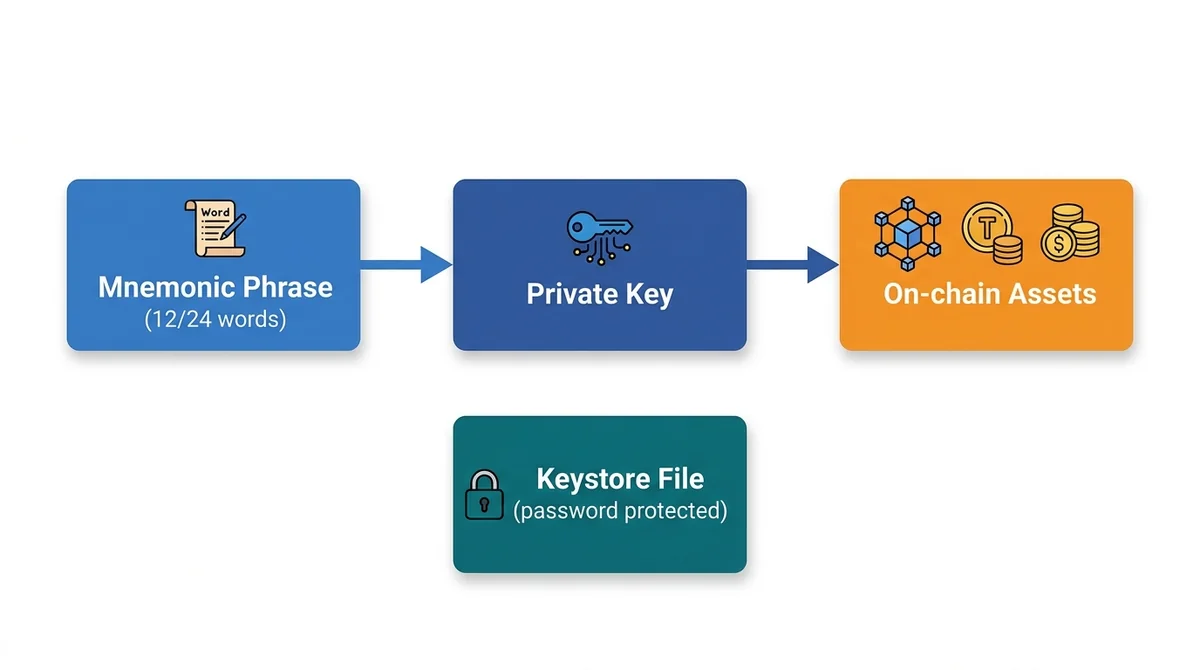
A crypto wallet file backup involves copying and storing the critical sensitive information that controls your assets: the mnemonic phrase, private key, or keystore file. A mnemonic phrase usually consists of 12 or 24 words and can be used to derive private keys; a private key is a random string that directly controls assets; a keystore file is an encrypted container for a private key and requires a password to use. To use an analogy, the mnemonic phrase is like the keychain to a safe, the private key is the safe itself, and the keystore file is a safe with a password lock. Backing up is not about having just one file—it's about ensuring these credentials can still be recovered if the original device is lost.
#Why Does Losing a Private Key Mean Permanent Loss of Assets?
In a non-custodial wallet, assets are controlled entirely by the private key. Without the private key, you cannot sign transactions, and on-chain assets cannot be moved. If the private key is lost and there is no backup, no centralized entity can help you recover it, and the assets will be permanently locked. This is the core of the blockchain security model: whoever holds the private key holds the assets.
#Common Causes and Warning Signs of Private Key Loss or Backup Leakage
#What Can Device Damage, Loss, or Forgotten Passwords Lead To?
Hardware wallet damage, lost phone, computer hard drive failure, fire or flood, or forgetting the keystore password can all lead to loss of backup information. Even if the device is still present, if the password is forgotten and there is no mnemonic backup, assets remain inaccessible.
#Which Actions Expose Backup Files to Attackers?
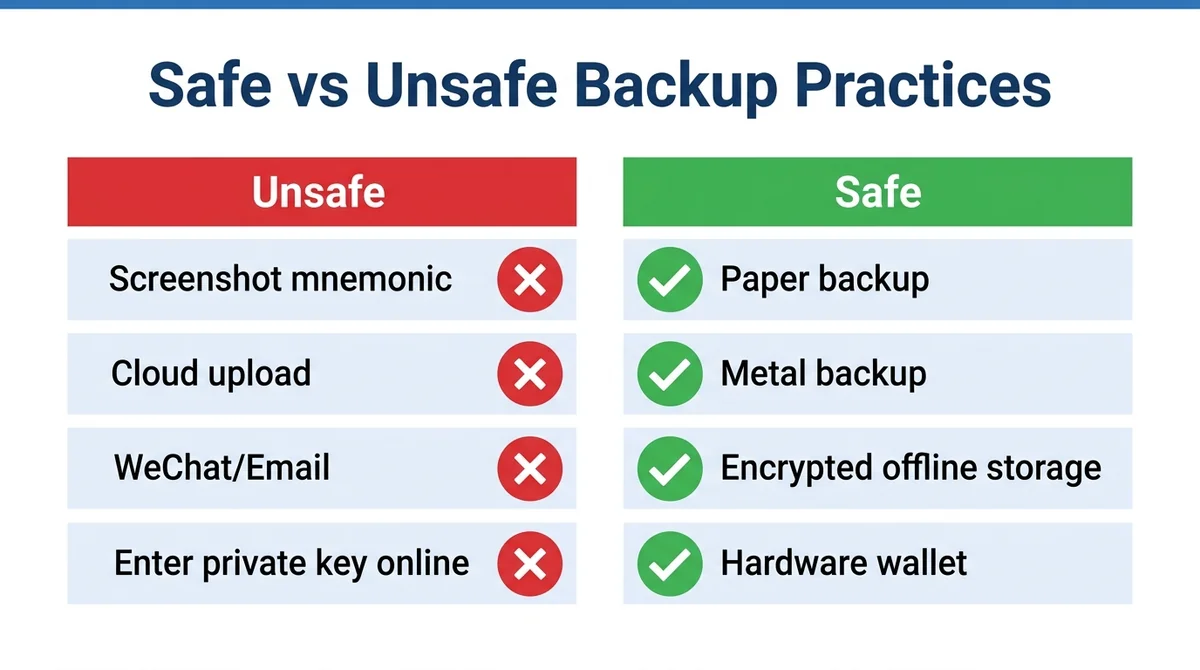
Frankly, many coin-loss incidents happen not because of sophisticated technology, but because users hand their private keys to others. Common high-risk behaviors include: saving a mnemonic phrase screenshot in the phone photo album, uploading it to the cloud, transmitting it through unencrypted channels like WeChat/email, entering a private key on an unfamiliar website, transmitting sensitive information over public Wi-Fi, and being tricked into entering a mnemonic phrase on a phishing website. These actions all put backups into attackers' hands.
#Which Actions Seem Convenient but Are Extremely Dangerous?
Those who have been burned know that a few “convenient” actions can wipe out assets. Taking a screenshot of the mnemonic phrase, copying and pasting it into notes, sending it to others via WeChat/email, entering a private key on an unfamiliar website to “verify a wallet,” using a simple password to encrypt the keystore, naming the backup file “mnemonic.txt” and storing it on the desktop—all are extremely dangerous behaviors. Any operation that exposes sensitive information to the online environment may be intercepted by malware.
#How to Recognize Phishing or Malware During Backup?
Be wary of websites, emails, or direct messages that ask you to enter your private key or mnemonic phrase. Legitimate wallets will never ask users to enter a mnemonic phrase in any web form. When installing software, download from official channels, check the URL spelling, and do not click links in text messages or emails. Use antivirus software and keep your system updated, and avoid using cracked wallets.
#How to Safely Back Up Crypto Wallet Files?
#How Should You Back Up a Mnemonic Phrase?
Mnemonic phrase backups should follow the principles of offline, handwritten, multiple copies, and off-site storage. When creating a wallet, write down the mnemonic phrase with pen and paper in an offline environment, and do not copy it to any electronic device. Store the written copies in a fireproof and waterproof secure location, recommend at least two copies in different places. Regularly check that the handwriting is clear and verify the recovery process.
#What Should You Pay Attention to When Backing Up Keystore Files?
A keystore file is essentially an encrypted private key, so you must set a strong password and store it offline. When backing up, keep the keystore file and password separate, and do not store them in the same place. Use an encrypted USB drive or offline storage medium, and avoid using cloud drives or email. Regularly test recovering the wallet with the password.
#How to Choose and Combine Paper Backups and Hardware Wallets?
Paper backups are low-cost but easily damaged, making them suitable as a basic backup. Hardware wallets are dedicated offline devices with higher security and can serve as cold backups. Recommended approach: use a hardware wallet to generate the wallet, write the mnemonic phrase on paper as a recovery backup, and use the hardware wallet itself as daily cold storage. Combining both provides higher redundancy.
#Emergency Response and Security Checklist After Backup Loss or Leakage
#What to Do If a Backup Is Lost but the Wallet Is Still Accessible?
Immediately create a new wallet and transfer all assets from the old wallet to the new address. Once you confirm that the old address no longer holds funds, you can abandon the old wallet. Revoke the old address's authorizations for related DApps and check device security.
#How to Transfer Assets Urgently If You Suspect a Backup Leak?
If you suspect that the mnemonic phrase or private key has been leaked, transfer assets as soon as possible. Prioritize using an uninfected device to create a new wallet and transfer assets, and avoid operating on devices that may be monitored. After the transfer, revoke the old address's authorizations, change all related passwords, and run a security scan on the device.
#What Should You Check Before Backing Up?
- Was the mnemonic phrase written down in an offline environment?
- Did you use pen and paper instead of an electronic device?
- Does the keystore file have a strong password?
- Are backups encrypted and stored in multiple off-site locations?
- Have you avoided online transmission such as cloud storage, screenshots, and email?
#How to Regularly Verify Backups?
Test the recovery process periodically (e.g., quarterly) to confirm the backup works. Check whether the backup medium is damaged and whether handwriting is clear. When updating backups, ensure all old backups are destroyed or securely updated. Always use multiple backups to reduce the risk of a single point of failure.
This article only introduces security practices for crypto wallet backups and does not constitute investment advice. Digital assets carry risks, so please assess them yourself.
FAQ
What is a crypto wallet file backup?
A crypto wallet file backup means copying and storing the mnemonic phrase, private key, or keystore file that controls your assets in a secure place. This way, even if your phone or computer is lost or damaged, you can use the backup to restore your wallet and regain control of your assets.
Can a mnemonic phrase backup be stored in the cloud?
Not recommended. The cloud may be hacked or your account may be leaked, causing the mnemonic phrase to be stolen. The correct approach is to write it down offline on paper, store multiple copies in different locations, and avoid taking photos or screenshots.
Can a lost private key be recovered?
No. The private key is the only credential that controls your assets. Once it is lost and there is no backup, the assets will be permanently inaccessible. Therefore, making secure backups in advance is the only way to protect them.
What should I pay attention to when backing up a keystore file?
A keystore file must be encrypted, set with a strong password, and stored offline. Do not keep the file and password together, and do not send them via WeChat or email. Regularly test whether you can recover using the password.
What should I do first if I discover a backup leak?
Immediately create a new wallet and transfer all assets from the old wallet to it. At the same time, revoke the old address's authorizations, check whether your computer and phone are infected, and change all related passwords.
Related Terms
Want to see the real data for this concept?
After you sign up, you can view live prices, funding rates, and fees for the related assets.
View live prices and fees →